结合webpack开发vue
使用webpack开发vue
1、搭建webpack环境
npm init -y
这里只使用到html-webpack-plugin,ES6转换到ES5模块和vue模块
npm i html-webpack-plugin babel-loader@7.1.5 babel-core babel-preset-env webpack@3 -D
npm i vue -S
2、配置config文件
let Hwp = require('html-webpack-plugin');

module.exports = {
    entry: __dirname + '/src/main.js',
    output: {
        path: __dirname + '/dist',
        filename: 'index.js'
    },
    devServer: {
        contentBase: __dirname + '/dist',
        port: 3000,
        inline: true
    },
    plugins: [
        new Hwp({
            template: __dirname + '/src/index.html',
            filename: 'index.html',
            inject: true
        })
    ],
    module: {
        rules: [
            { test: /\.js$/, exclude: /node_modules/, loader: 'babel-loader' }
        ]
    }
}
4、测试vue项目
// main.js
import Vue from 'vue'

let app = new Vue({
    el: '#app',
    data: {
        username: 'daotin'
    },
    methods: {}
});
在index.html中
<div id="app">
    <p>{{username}}</p>
</div>
这时候会报错:
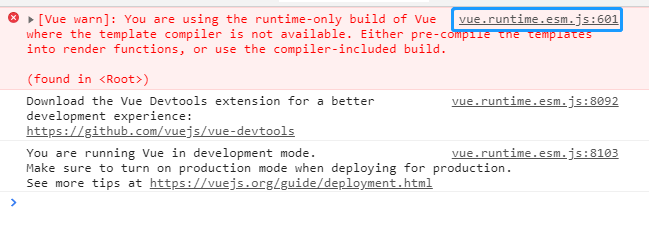
原因是:
在node_modules的vue文件夹下的package.json中可以看到:
"main": "dist/vue.runtime.common.js",
当我们使用import或者require的时候,默认引入的是vue.runtime.common.js,而不是vue/dist下的vue.js文件,引入这个vue.js才可以使用 new Vue({}) 的形式。
解决办法:
1、修改为"main": "dist/vue.js",,不推荐,别人拷贝的项目无法运行
2、import Vue from 'vue/dist/vue.js',缺点是写法太low。
3、在配置文件起别名(推荐)
resolve: {
    alias: {
        'vue': 'vue/dist/vue.js'
    }
}
注意:
如果上面引入的vue文件夹下package.json没有main属性,那么会引入vue文件夹下index.js文件,如果没有在尝试引入index.json文件,都没有?报错。